Christmas at SF Vintage: Ugly Sweater Sip & Shop Dec 4 (RSVP) and the Craftpocalypse tree hat workshop Dec 11. See the events →

MapsEventsSell & AskAbout
San Francisco Vintage
For vintage sellers and event producers

Fill the Room Launch Kit

The six-week plan behind bringing Social Media Prom back to San Francisco. A room calculator, 24 copy-ready templates, a press system, a sponsor playbook and a task tracker, so you stop guessing and start selling tickets.

By Krystyl Baldwin, San Francisco Vintage.

Instant download
$49
  • Interactive kit that opens in any browser
  • Task-tracking spreadsheet: tasks, sponsors, staff, materials
  • Print version as a PDF
  • Pay once, use for every event you run

Secure checkout by Square. Your download button appears the moment payment clears. By buying, you are added to our newsletter; unsubscribe any time.
6weeks, mapped out
24copy-ready templates
9parts, plus a tools list
7tab task tracker
Sound familiar?

Most events are lost before the first post.

Reach is one goal. A full room of the right people is another. They ask for different content, different press and different math. This kit is built for the second one.

Why I made it

The monkey changed who the night was for.

When I started planning Social Media Prom, my first draft of the story was about missing prom. It was fine, and it was not true. The real story was better: on a dare, I brought an inflatable monkey to my junior prom and dragged it around the dance floor all night.

That changed who the event was for. It stopped being a do-over for people who missed out and became a night for people who bring the wrong thing on purpose. Everything after that, the posts, the press, the partners, got easier, because there was something true to say.

I run San Francisco Vintage from Historic Downtown Angels Camp, with roots in San Francisco, and I put on events the same way I run the shop: by hand, with a plan. This is the plan. It is the calendar, the scripts, the press system and the partner emails I used, with the blanks left for yours.

Krystyl Baldwin

What you will be able to do

Know your numberEnter capacity, comps and ticket price and see exactly how many tickets to sell, week by week.
Find the story people shareFive prompts and a one-sentence test, so you post a true story instead of an announcement.
Never wonder what to postA six-week calendar that fills in with your real dates, plus six video scripts built on one structure.
Get press to answerBuild a hot list from thousands of names down to the few hundred worth pitching, with three pitch angles ready to send.
Land sponsors and partnersName your costs as lines a sponsor can take, ask for cash or in-kind, and follow up without nagging.
Run the night, then follow upRun of show, thank-yous, partner recaps, and what to keep so the next event starts ahead.

See inside

Real screens from the kit you download. The calculator and checklist work in your browser, and the templates copy with one click.
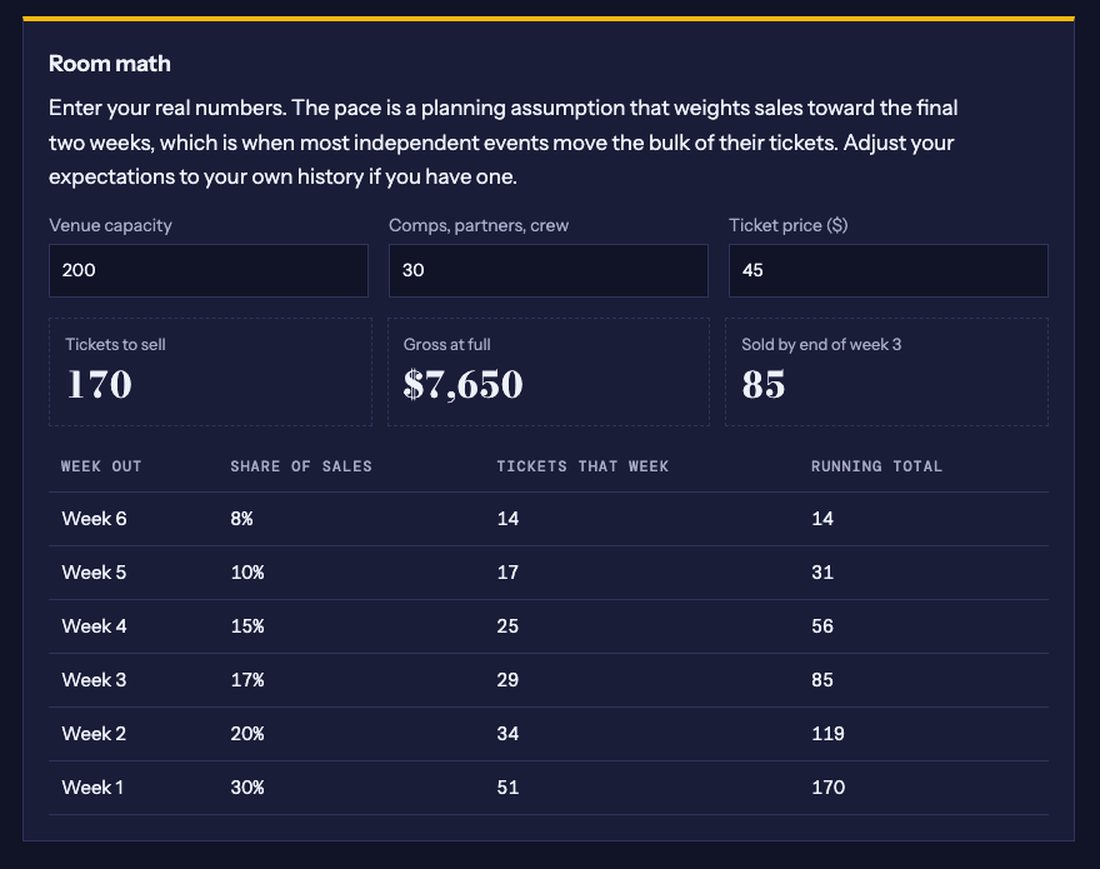
The room calculator: Type your numbers and see tickets to sell and the weekly pace.
The room calculator
Type your numbers and see tickets to sell and the weekly pace.
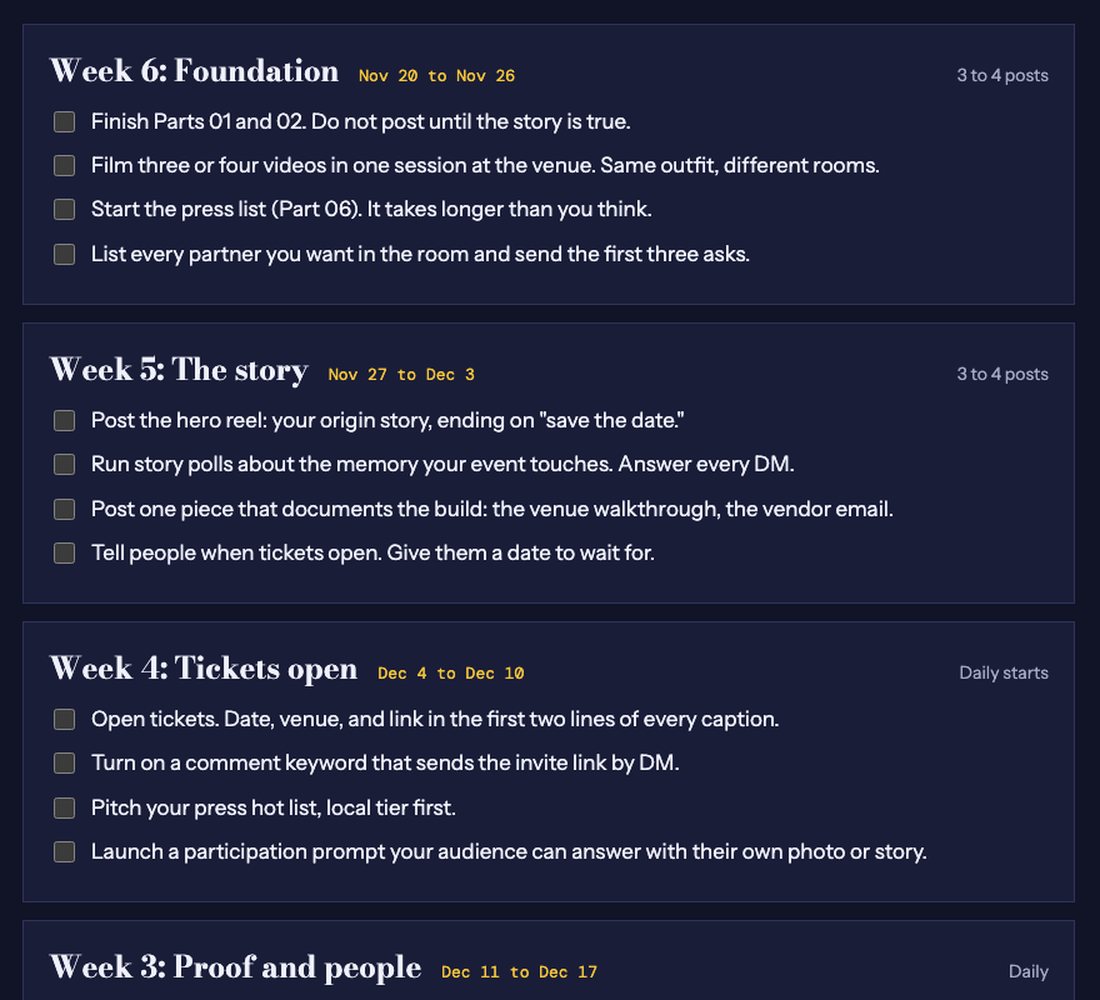
The six-week calendar: Enter your date and every week fills in with real dates and four tasks each.
The six-week calendar
Enter your date and every week fills in with real dates and four tasks each.
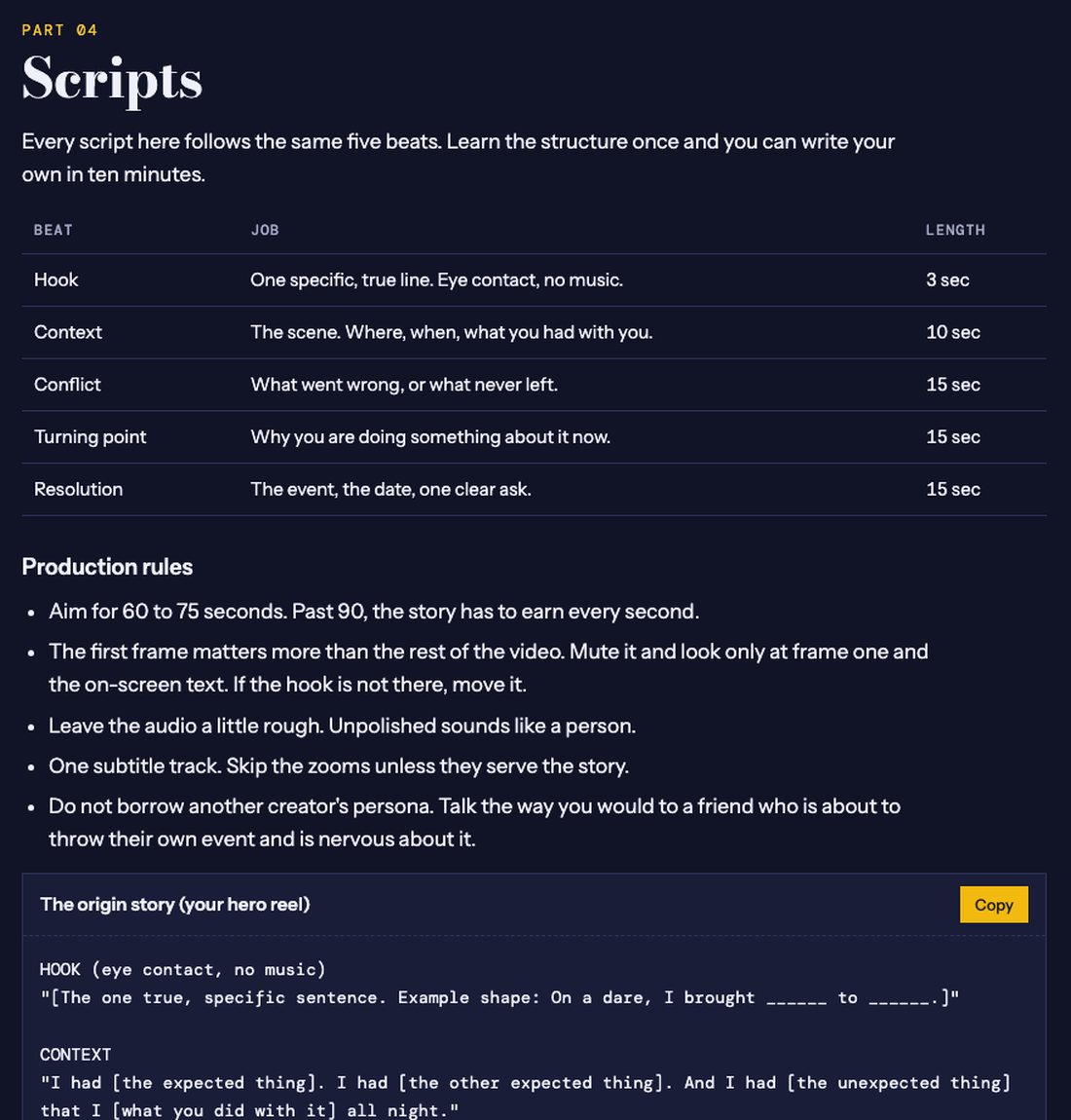
Scripts you can copy: One structure, six scripts, each with a Copy button.
Scripts you can copy
One structure, six scripts, each with a Copy button.
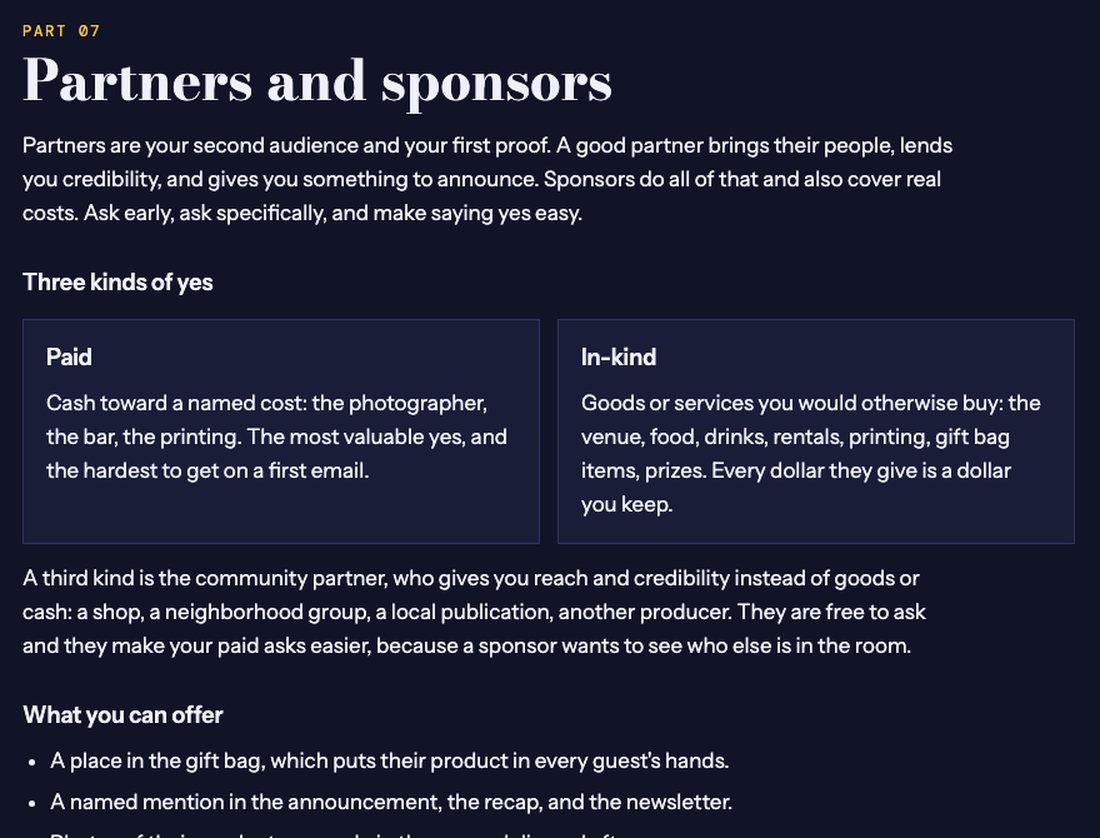
The sponsor playbook: Paid, in-kind and community yeses, with who to ask and what to say.
The sponsor playbook
Paid, in-kind and community yeses, with who to ask and what to say.
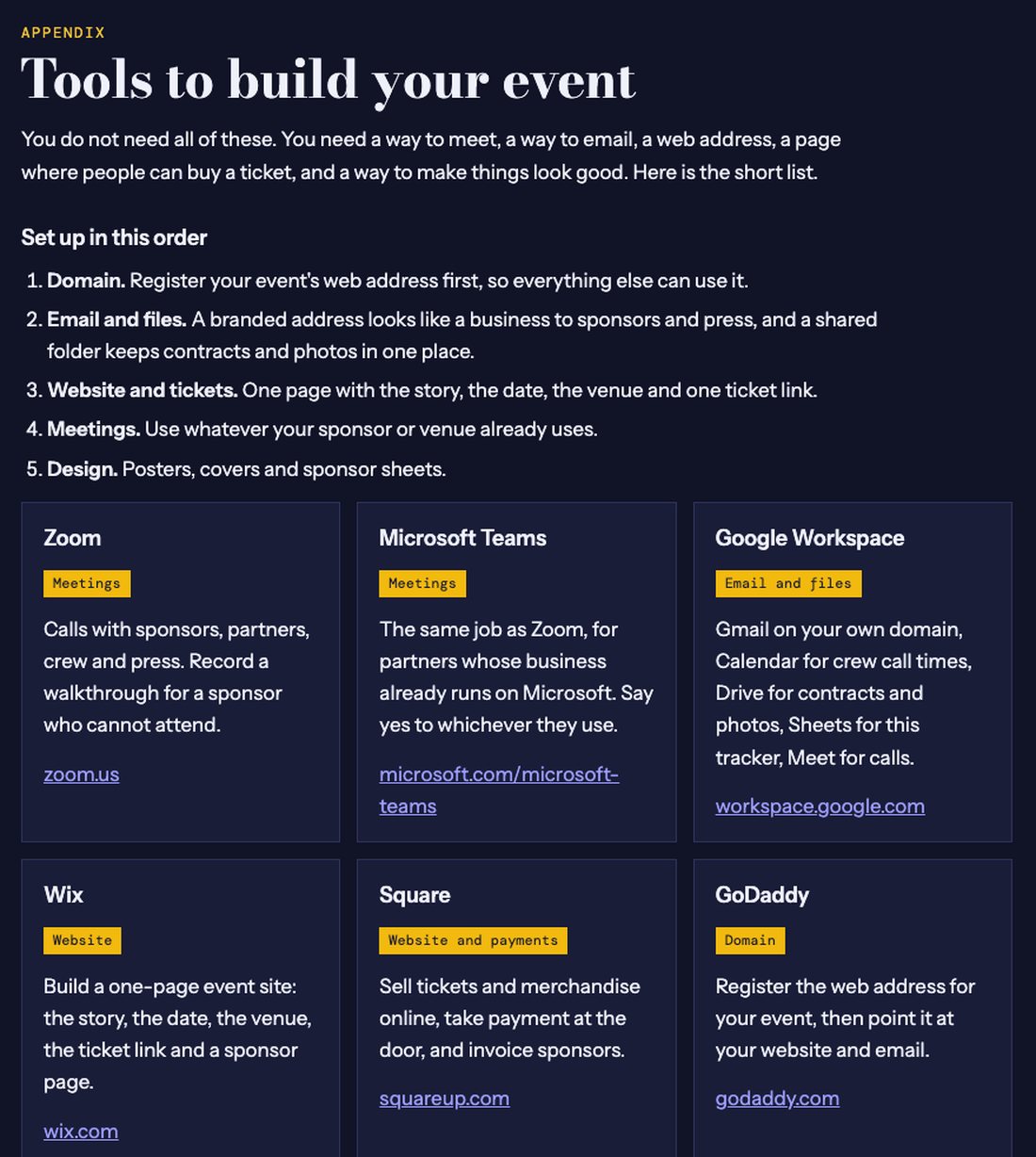
The tools list: The sites to set up, in the order to set them up.
The tools list
The sites to set up, in the order to set them up.

Nine parts and a tools list, in the order you need them

Work through it in order; each part builds on the one before.

Part 01Start hereDecide what you are filling. The room calculator turns your capacity, comps and ticket price into tickets to sell, gross at full, and a week-by-week pace.
Part 02Find the true storyPeople share stories, not announcements. Five prompts and a one-sentence test to find the true, slightly odd reason you are the one throwing this.
Part 03The six-week calendarEnter your event date and every week fills in with real dates, what to film, what to post, who to ask, and when to open tickets.
Part 04ScriptsSix video scripts built on one five-beat structure: the origin story, the redemption pitch, the object that waited, the venue tour and more.
Part 05Captions and coversCaption and cover rules, the three-line cover formula, and the comment-keyword trick that sends your invite link by DM.
Part 06The press systemBuild a press list in five steps, with beat tags to adapt, four tiers, and three pitch angles: the scene, the local angle and the bigger idea.
Part 07Partners and sponsorsPaid, in-kind and community yeses: what to look for, who to ask and where to find them, how to price named sponsor lines, and a follow-up rhythm that keeps the conversation alive.
Part 08The night itselfRun of show, the photographer shot list and the logistics post, so the evening runs without you putting out fires.
Part 09After the last songAttendee note, partner recap and recap caption, plus what to keep so the next event starts ahead of this one.
AppendixTools to build your eventAn appendix of the sites to set up, in order: GoDaddy for the domain, Google Workspace for email, Wix or Square for the site and tickets, Zoom or Teams for meetings, and Canva for design.

24 templates, ready to copy

Video scripts
  • The origin story (hero reel)
  • The redemption pitch
  • The object that waited
  • The venue tour
  • Three things I am scared about
  • The position post
Captions and covers
  • Caption: tag a friend
  • Caption: the do-over
  • Cover: the three-line formula
Press pitches
  • The scene angle
  • The local angle
  • The bigger-idea angle
Sponsors and partners
  • The partner ask
  • The paid sponsorship ask
  • The in-kind ask
  • Follow-up one
  • Follow-up two, with something new
  • The sponsor confirmation
  • The sponsor recap and next ask
  • The tagging note
  • Partner thank-you
After the event
  • Attendee note
  • Partner recap
  • Recap caption
A free taste · the origin story
HOOK (eye contact, no music)
"[The one true, specific sentence. Example shape: On a dare, I brought ______ to ______.]"

CONTEXT
"I had [the expected thing]. I had [the other expected thing]. And I had [the unexpected thing] that I [what you did with it] all night."

CONFLICT
"I'm [who you are now]. I [what you do] in [your city]. The [unexpected thing] never left."

TURNING POINT
"So I'm throwing [your event] for the people the [unexpected thing] would recognize."
Every script follows the same five beats. Learn the structure once and you can write your own in ten minutes. The kit has the full text of all 24 templates.

Everything that is included

  • ✓The interactive kit: room calculator, six-week calendar, checklist that remembers your progress
  • ✓24 copy-ready templates: scripts, captions, press pitches, sponsor and partner emails, thank-yous
  • ✓The sponsor playbook: paid, in-kind and community, with a follow-up rhythm
  • ✓The task-tracking spreadsheet: tasks, sponsor pipeline, sponsor budget, staff, marketing materials and tools
  • ✓The tools list: domain, email, website and tickets, meetings, design
  • ✓A print version as a PDF, for marking up on paper
This is for you if
  • Vintage and antique dealers running a market, pop-up or sale
  • Makers and shop owners planning a ticketed night
  • Market and event organizers who need to fill a room, not just post about it
  • Estate-sale and consignment businesses starting an event series
  • First-time producers who want a plan instead of guesswork
This is not for you if
  • Large corporate events with a marketing team and an agency
  • Anyone looking for paid-ads strategy: this kit is organic, story-led promotion
  • Events with no ticket or RSVP, where headcount does not matter

Questions

What do I get?

One download with four files: the interactive kit (opens in any web browser), a print version as a PDF, a task-tracking spreadsheet and a short read-me. The kit includes the room-math calculator, the six-week calendar, 24 copy-ready templates and a checklist that remembers your progress.

Who is it for?

Anyone filling a room: vintage and antique dealers, market organizers, makers hosting a pop-up, shop owners planning a ticketed night, and estate-sale or consignment businesses starting an event series.

Is it only for vintage events?

It was built from a vintage-and-creator event, but the plan works for any independent, ticketed event: markets, pop-ups, dinners, shows and workshops.

Do I need a big following?

No. The kit starts from the people you can name: a true story, personal invitations, partners who bring their own audiences. The posting rhythm starts at three or four posts a week.

How does it arrive?

The moment your payment clears you land on a page with your download button. Keep that page: it is your link back to the files whenever you need them.

Which apps do I need?

A web browser for the kit, and Excel, Numbers or Google Sheets for the tracker. The tools list in the kit covers everything else you might set up.

Can I use the templates for more than one event?

Yes. The kit is for your own use in producing your events, as many as you like. Please do not resell or redistribute it.

What if something goes wrong?

Write to us through the contact page with the email on your Square receipt and we will sort it out.

Ready to fill your room?

$49, one time. Instant download. Use it for every event you run.

Vend in the BayAsk a question